

 All Products


RJ45 Connectors: A Comprehensive Guide
 Mar 07, 2025
 660
660Catalog
What is an RJ45 Connector?RJ45 Features and CapabilitiesRelevant Standards for RJ45 ConnectorsPrimary Applications of RJ45 DevicesRJ45 Connector PinoutCategory of RJ45 ConnectorTypes of RJ45 ConnectorsApplications of RJ45 ConnectorsAdvantages and Disadvantages of RJ45 ConnectorsTroubleshooting RJ45 ConnectionsDesign and Product Selection ConsiderationsConclusionRelated ArticlesThe application of modular electronic connectors has been a significant contributor to the rapid expansion of communication and data services globally. Among the modular family of devices, the RJ45 connector is one of the most extensively utilized types.
As discussed in a previous blog post, AT&T developed the modular connector system during the 1960's and 1970's to replace cumbersome phone connectors and their laborious installation process. This innovative connector system provided a straightforward, rapid, and convenient setup that could be tailored on-site by a technician or easily installed by users at home. Over the years, the range has expanded to encompass data communication essentials, such as the RJ45, which was specifically designed for computer networking. In fact, RJ45 connectors are commonly known as Ethernet Connectors.
What is an RJ45 Connector?
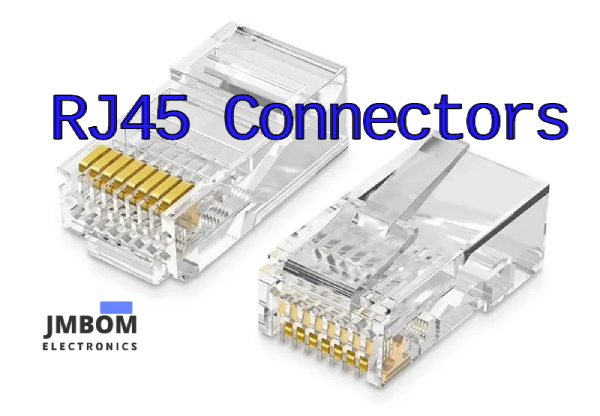
An RJ45 connector is a widely used modular interconnection device that, when paired with a cable, delivers data communication services to a variety of electronic devices and systems.
The different connectors created using this system were classified by the FCC in 1976 into the Registered Jack (RJ) system, which led to the RJ designation. This was done to ensure compatibility between phone company hardware and consumer equipment. The RJ system encompasses the physical connector, wiring patterns, and signal specifics.
Like all modular connectors, RJ45 devices consist of metal contacts separated by insulating plastic channels. The channels fit into a matching socket, and the connectors are secured in place with a tab, making them both stable and removable. Internally, RJ45 devices contain 8 pins and 8 wire positions for handling signals or power, allowing them to accommodate 4 twisted wire pairs.
The 8-pin configuration of an RJ45 is similar to that of 8P8C connectors. However, true RJ45 connectors also feature a tab that only permits insertion of the device in one orientation with a compatible socket to prevent improper wiring connections. Thus, an RJ45 is a type of 8P8C connector. Nevertheless, in common usage, most 8P8C connectors are referred to as RJ45, which is not entirely accurate. You can insert 8P8C connectors into RJ45 sockets, but the reverse is not possible.
RJ45 Features and Capabilities
RJ45 connectors possess the fundamental features of modular connectors: low cost, solderless assembly of the connector and wiring, quick production of custom cables, easy insertion and removal, simple field assembly with basic tooling, and the ability to customize cables on-site. Sockets (or receptacles) can also have either a vertical or horizontal orientation, enabling their use in a wide range of applications.
In addition to these features, RJ45 connectors also include the aforementioned orientation tab to prevent incorrect wiring. Their 8-pin configuration also means that they can be employed in more demanding and data-intensive applications.
Other available features may include:
- Shielding - to counteract the effects of EMI/RFI
- Keying - to ensure proper insertion
- Various mounting options - to allow for panel, board, surface, or through-hole methods
- Displays and indicators - to show connection status
- Integrated magnetics - to provide better shielding and current protection
- Hi-Rel - to offer protection for the hardware and the connection
Relevant Standards for RJ45 Connectors
The RJ45 connectors adhere to a variety of engineering standards based on their specific applications. The ANSI/TIA 1096-A standard addresses the fundamental physical dimensions, mechanical attributes, and contact specifications for RJ45 devices. The basic wiring standards T-568A and T-568B pertain to RJ45 wiring and pin configurations. IEEE standards 802.3at, 802.3af, and 802.3bt encompass Ethernet specifics and details for power over Ethernet (PoE) devices, where the connector supplies electrical current to the end device. IEEE 1394 outlines the data interface bus structure utilized with RJ45 devices. A range of other standards cover the cables or wiring used with RJ45 devices, largely contingent on the specific application. We will delve into several of these standards in more detail below.
Primary Applications of RJ45 Devices
RJ45 devices are primarily employed to link an internet-enabled device (such as a PC) with another network device like a server, router, modem, smart TV, gaming console, or other devices that utilize the Ethernet protocol. Ethernet networks are prevalent in both professional and domestic settings. Hardwiring via RJ45 devices allows for higher data speeds with stability and security of data transfer, making them appealing for use in industry and on the factory floor.
RJ45 Connector Pinout
The RJ45 connector is a modular 8-position, 8-pin connector designed for terminating Cat5e or Cat6 twisted pair cables. A pinout refers to the specific arrangement of wires that determines how the connector is terminated. There are several pinout configurations for RJ45 connectors, including straight-through (T568A or T568B), crossover, rolled, T1, and loopback. The straight-through configuration is the most common and is typically used to connect a computer to a network. The other pinouts are intended for specialized cables used in specific networking applications.
Regarding straight-through wiring, there are two recognized standards by ANSI, TIA, and EIA: T568A and T568B. T568B has become the more widely adopted standard and is now considered the default wiring scheme for structured cabling with twisted pairs. If you're uncertain which standard to choose, it's advisable to go with T568B.
Category of RJ45 Connector
The choice of an RJ45 connector is determined by the network cable used; it is essential that the connector matches the cable's grade and performance to ensure optimal performance and compatibility in network applications.
| Category | Transmission Frequency | Transmission Speed | Application |
| CAT5E | 100Mhz | 1000Mbps | general household and small business environments |
| CAT6 | 250Mhz | 1000Mbps | medium-sized office and enterprise environments |
| CAT6A | 500Mhz | 10Gbps | large enterprises, high-density environments, and professional applications |
| CAT7 | 600Mhz | 10Gbps | data centers, high-speed and bandwidth-intensive applications |
Types of RJ45 Connectors
A range of RJ45 connectors can be found, contingent on the specific application. They are as follows:
- Conventional - 8 position, 8 contact, unshielded.
- Shielded - connectors with internal shielding that link to shielded cables. They might also be referred to as RJ48.
- Robust - equipped with various external components to safeguard the device in harsh conditions. Also known as Hi-Rel, short for high-reliability.
- 10 Pin RJ45 - a 10 pin connector utilized when all serial lines are required, like with a T1 line.
- Miniaturized - a compact version of the standard RJ45.
RJ45 Magnetic Jacks
Magnetics are coil-wound components (similar to transformers) that offer EMI shielding, safeguard against faults and transients, and provide electrical isolation and signal balancing. Magnetics can be integrated into Ethernet designs in two primary ways. One option is to incorporate a magnetics module on the circuit board between the PHY (Ethernet implementation) chip and the connector jack. Another alternative is to use an RJ45 connector with built-in magnetics in the housing.
Modules are generally more cost-effective than integrated devices and provide superior electrostatic discharge (ESD) protection. RJ45 connectors with integrated magnetics offer enhanced EMI shielding and more dependable connections. Both approaches have their pros and cons, but magnetics need to be taken into account when incorporating wired Ethernet into a design, as they are part of the Ethernet specification for 10/100/1000 Base-T networks.
Applications of RJ45 Connectors
When incorporating Ethernet capability into a system, utilizing RJ45 connectors with Cat5 or Cat6 cabling is the conventional solution for connectivity in networks, peripherals, and telecommunications. The addition of enhanced features and capabilities, such as higher speed and ruggedness, to the RJ45 product line has made this interconnection system suitable for applications beyond office or home networking.
The advent of the EtherCAT protocol has led to its expanded utilization on the factory floor and beyond. Some of the newer applications that leverage RJ45 technology are:
- Factory Automation
- Industrial Process Control
- Industrial Robotics (fabrication and assembly)
- Test and Measurement Systems
- Quality Control Systems
- Voice Over Internet Protocol (VOIP) Systems and Devices
- Internet of Things (IOT) Network Devices
Advantages and Disadvantages of RJ45 Connectors
Advantages
Reliability: RJ45 connectors ensure a stable and secure connection, promoting consistent data transmission with minimal interference or signal degradation.
Speed: These connectors facilitate high-speed data transfer, making them suitable for modern Ethernet standards like Gigabit and 10 Gigabit Ethernet.
Bandwidth: RJ45 connectors can support data rates of up to 100 Mbps.
Versatility: Widely used and standardized, RJ45 connectors are compatible with a vast array of devices and networking equipment.
Ease of Use: The design features a locking latch and a simple crimping process, making RJ45 connectors user-friendly for both professionals and DIY enthusiasts.
Cost-Effective: Generally affordable, RJ45 connectors and Ethernet cables offer an economical solution for establishing and maintaining wired networks.
Disadvantages
Limited Mobility: Unlike wireless connections, RJ45 connectors necessitate physical cables, which can limit the mobility of connected devices.
Compatibility: RJ45 connectors may face compatibility issues with other types, as different cable categories require specific RJ45 variants.
Installation Complexity: Although crimping RJ45 connectors isn't overly challenging, it demands specific tools and a basic grasp of wiring standards, which can deter some users.
Susceptibility to Damage: Ethernet cables and connectors are vulnerable to physical damage, such as bending or crushing, which can affect network performance.
Troubleshooting RJ45 Connections
Despite proper crimping and color coding, issues can still occur. Common problems include loose connections, incorrect pin layouts, and damaged cables. Here are some troubleshooting tips:
Check Connections: Make sure the connector is securely inserted into the port and that the latch is properly engaged.
Verify Pin Layout: Double-check the pin configuration to confirm that the correct wiring standard (T568A or T568B) has been used.
Inspect Cable: Examine the cable for any visible damage that could impact performance.
Design and Product Selection Considerations
When designing products or systems with RJ45 connectivity, it's essential to ask and answer several key questions. Here are some important factors to keep in mind:
- What cable lengths will be needed?
- Should we use shielded connectors?
- Are integrated magnetics or board-mounted modules preferred?
- Which pinout protocol is optimal for the design?
- Will the system support Power over Ethernet (PoE)?
- Do we need rugged or high-reliability devices?
- Will the product be exposed to high levels of EMI or ESD?
- What data transfer speed is required?
- What is the necessary bandwidth?
Conclusion
Grasping the concept of an RJ45 connector, along with its components and functionality, is crucial for anyone working in networking. These connectors provide reliable connections and facilitate efficient data transmission, making them the backbone of wired networks. Whether you're establishing a home network or overseeing enterprise-level infrastructure, mastering RJ45 connectors is vital for ensuring robust and effective network communications.
Related Articles
Introduction to HDMI Connectors
A Complete Guide to Fiber Optic Connectors
Audio Connectors:Description,Types and Applications
Active Optical Connectors: Features, Types, and Applications

Amanda Miller
Amanda Miller is a senior electronics engineer with 6 years of experience. She focuses on studying resistors, transistors, and package design in detail. Her deep knowledge helps her bring innovation and high standards to the electronics industry.
Subscribe to JMBom Electronics !