

 All Products


VGA vs HDMI: What's the Difference?
 Oct 22, 2025
 760
760Catalog
Difference between VGA and HDMIWhat is VGA?What is HDMI?Main Differences between VGA and HDMIWhich is Better: HDMI or VGA?When to Use VGA or HDMI CablesThe Final WordFrequently Ask QuestionsVGA and HDMI are both popular interface standards used for connecting various electronic devices like DVD players, laptops, and computers to display devices such as projectors, computer monitors, or TVs. VGA stands for Video Graphics Array, while HDMI stands for High-Definition Multimedia Interface.
The key difference is that VGA only transmits video signals, whereas HDMI carries both audio and digital video signals. In terms of video quality, HDMI offers superior performance compared to VGA.
This article highlights the main differences between VGA and HDMI, while both cables share similarities, including the interface, video signal transmission, pins, and compatibility with converters.
Difference between VGA and HDMI
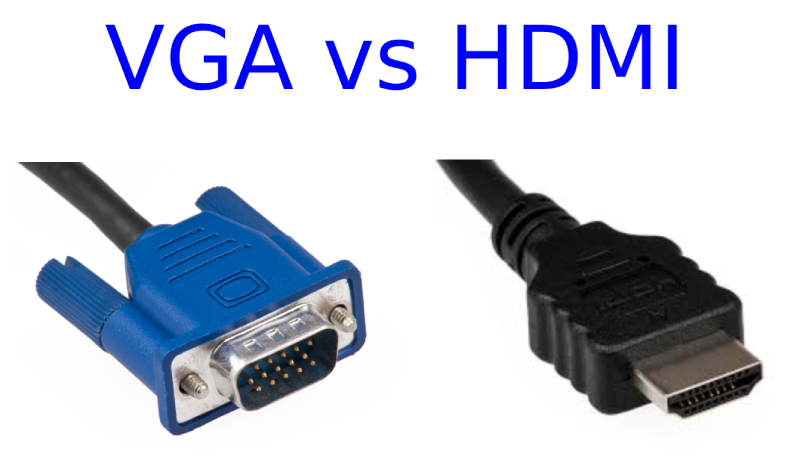
The main differences between VGA and HDMI lie in their definitions and core features. However, both share some similarities: they use the same type of interface, transmit video signals, feature pins, and are compatible with converters.
What is VGA?
VGA (Video Graphics Array) is an older video standard that was developed by IBM for their personal computers. It became widely adopted and remained the standard for most PC manufacturers. VGA is primarily designed for transmitting video signals, and it can only carry a single video signal at a time.
VGA typically supports a resolution of 640 x 480 at a 60Hz refresh rate. It uses analog signals rather than digital. The connection between the monitor and the CPU is made through a VGA cable.
What is HDMI?
HDMI (High-Definition Multimedia Interface) is a modern standard created by electronics manufacturers for transmitting digital signals between various devices. Unlike VGA, HDMI is much more versatile, as it can carry both high-definition video and digital audio signals. HDMI supports up to 8 channels of audio and includes a CEC (Consumer Electronics Control) channel for device communication.
One of HDMI's key advantages is its convenience: instead of needing multiple cables for video and audio, you only need a single HDMI cable to connect devices. This makes it a much simpler and cleaner solution for modern setups.
Main Differences between VGA and HDMI
| Feature | VGA | HDMI |
|---|---|---|
| Developed By | IBM | Hitachi, Philips, Panasonic, Sony, Thomson, etc. |
| Full Form | Video Graphics Adapter | High-Definition Multimedia Interface |
| Age | Older standard | Newer standard |
| Signal Type | Transmits only video signals | Transmits both audio and video signals |
| Signal Type (Analog/Digital) | Analog | Digital |
| Gaming Suitability | Not ideal for gaming | Better suited for gaming |
| Converter Compatibility | Works with DVI converters | Works with both DVI and VGA converters |
| Audio Signal | Requires a separate cable for audio | No extra cable needed for audio signals |
| Typical Use | Common in computers | Used in media players and HD TVs |
| Converter Cost | VGA to HDMI converters are more expensive | HDMI to VGA converters are cheaper |
| Resolution Support | Limited resolution support | Supports higher resolutions |
| Pin Specifications | 15 pins, RGB analog video signal | 19/29 pins, digital audio and video signals |
| Connector Color | Typically blue, 15-pin male/female connectors | Available in multiple types: Type-A, Type-B, Type-C, Type-D, Type-E |
| Max Refresh Rate | 60Hz | 240Hz |
| Max Resolution | 1600×1200 | Up to 920×1200 |
| Availability | Common on older monitors | Found on current monitors |
| Adaptability | Can be adapted to HDMI | HDMI can be adapted to VGA |
| Input Lag | Low | Slight |
| Signal Interference | Higher signal interference | Minimal signal interference |
Which is Better: HDMI or VGA?
Based on the comparison between VGA and HDMI, HDMI is clearly the better option for several reasons. HDMI can transmit more data and, unlike VGA, it carries both audio and video signals. On the other hand, VGA only supports video and offers lower resolutions, resulting in a less sharp image quality.
For activities like watching movies, HDMI provides superior resolution and color depth. The HDMI connection ensures vibrant colors and high-definition visuals, while VGA tends to produce a more washed-out image, which can affect your viewing experience, especially on larger TVs. Plus, HDMI handles audio as well, so you don’t need extra cables for speakers.
When it comes to gaming, HDMI also takes the lead. VGA can only support refresh rates between 60Hz to 85Hz, while HDMI can handle much higher refresh rates, which is essential for smooth, high-performance gaming. For instance, HDMI 2.0 supports up to 240Hz at 1080p.
In short, HDMI is the superior choice for higher-quality visuals, audio, and gaming performance, thanks to its digital signal and ability to transmit more data.
When to Use VGA or HDMI Cables
Choosing between VGA and HDMI cables depends on the devices you're working with. VGA cables are essential for connecting older computers or devices that only have VGA ports, especially when high-definition video isn’t a priority. On the other hand, HDMI is the standard for newer devices that support high-definition or ultra-high-definition displays. It’s ideal for transmitting both video and audio signals through a single cable.
Before making your choice, check the specifications of your devices to confirm which ports are available. Some older devices with VGA ports can still support higher resolutions, in which case using a VGA to HDMI adapter or converter can help you enjoy HDMI-quality performance.
HDMI Variants
It's important to note that HDMI comes in different types. For everyday use, a standard HDMI cable should suffice. However, for UHD devices or features like Audio Return Channel (ARC), you may need a high-speed HDMI cable for optimal performance.
Best Displays for HDMI and VGA
If you're looking for a display that maximizes the capabilities of high-speed HDMI cables, consider the PREDATOR CG48 Widescreen Gaming LCD Monitor. This top-tier 48-inch 4K OLED display delivers vibrant visuals with a resolution of 3840 x 2160, enhanced by its HDR10 media profile—ideal for gaming or UHD video streaming.
For those needing VGA compatibility, the SA2 Ultra-Thin Monitor is an excellent choice. At just 7.2 mm thick, it’s a sleek, high-definition monitor that includes a VGA port, making it perfect for home offices or workspaces where you need both design and functionality.
The Final Word
VGA and HDMI cables essentially serve the same purpose but in very different ways. While VGA may feel outdated, it still holds value for connecting older hardware, and sometimes, that's exactly what you need. On the other hand, HDMI stands out for its versatility and superior performance, making it the go-to choice for most modern setups.
In the end, while VGA has been reliable in the past, HDMI is the clear winner today. It offers better overall performance, seamless compatibility with most devices, and top-notch video and audio quality, making it a solid upgrade for any tech setup.
Frequently Ask Questions
Does HDMI to VGA improve quality?
No, HDMI to VGA doesn't improve quality. HDMI is digital, while VGA is analog. HDMI can carry both audio and video, whereas VGA only transmits video. HDMI also supports higher resolutions and refresh rates than VGA. Plus, HDMI cables can be longer without losing signal quality, unlike VGA.
Is VGA good for 1080p?
Yes, VGA can handle 1080p resolution at 60Hz. VGA (Video Graphics Array) is an analog standard that can support up to 1920x1080 (1080p) at 60Hz.
Is VGA more blurry than HDMI?
Yes, VGA tends to be blurrier than HDMI. Since VGA uses an analog signal, the picture can appear softer or less sharp, especially on modern displays. HDMI, on the other hand, supports higher resolutions and refresh rates, resulting in a clearer image.
When should I use HDMI?
Use an HDMI cable when both your devices have HDMI ports and you want the best possible digital video and audio quality. HDMI is ideal for modern devices that support high-definition or 4K content.
What is VGA used for today?
VGA (Video Graphics Array) is still used to connect older computers and video devices to monitors, projectors, and TVs. It’s mainly found in legacy systems or older equipment that doesn’t support HDMI.
Is VGA still used in 2025?
Yes, VGA is still relevant in 2025, especially in environments that rely on older technology. It’s a cost-effective solution for legacy devices. However, if you’re upgrading your workspace or setting up new equipment, it’s better to invest in more modern video standards like HDMI or DisplayPort for better performance and future-proofing.
What are the disadvantages of VGA compared to HDMI?
The main drawbacks of VGA compared to HDMI are lower resolution support, no audio transmission, and a higher risk of signal degradation. VGA also uses bulkier connectors and doesn’t support advanced features like HDR or enhanced color depth.
Can VGA do 60Hz?
Yes, VGA can support 60Hz, especially at lower resolutions like 640x480. However, higher resolutions at 60Hz are also possible, but the image quality may be affected due to the analog nature of VGA.

Amanda Miller
Amanda Miller is a senior electronics engineer with 6 years of experience. She focuses on studying resistors, transistors, and package design in detail. Her deep knowledge helps her bring innovation and high standards to the electronics industry.
Subscribe to JMBom Electronics !