

 All Products


What is a VGA Connector? Pin Configuration & Applications
 Oct 27, 2025
 680
680Catalog
What is a VGA Connector?VGA Connector Pin ConfigurationFeatures & SpecificationsDifferent TypesHow to Choose a VGA ConnectorHow to Use a VGA Connector to Connect a PC and TVAdvantages and DisadvantagesWhen to Use / ApplicationsConclusionFrequently Ask QuestionsA computer port is the interface that connects external devices, such as keyboards, printers, mice, flash drives, and speakers, to the computer. There are various types of computer ports where cables from peripheral devices plug in, enabling data transfer between the devices. This article explores one of these ports: the VGA connector, and how it works.
What is a VGA Connector?
The VGA (Video Graphics Array/ Video Graphics Adapter) connector is a type of computer port used to link peripheral devices for transmitting video signals as output. It became a widely used display standard, developed by IBM and introduced in 1987.
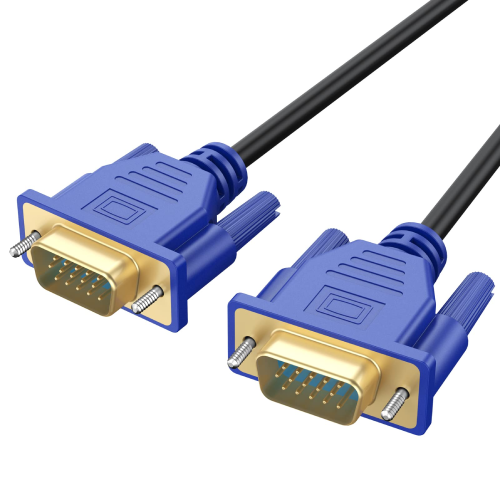
VGA Connector
The VGA connector supports color displays with a 640 x 480 resolution, a 60 Hz refresh rate, and can show up to 16 colors simultaneously. If the resolution is lowered to 320 x 200 pixels, up to 256 colors can be displayed. VGA uses analog signals, which result in lower resolution and less sharp display quality compared to modern digital connections.
VGA Connector Pin Configuration
The VGA connector has a total of 15 pins, each with a specific function. Below is the description of each pin:
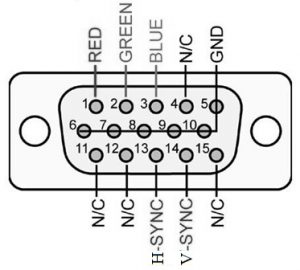
VGA Connector Pin Configuration
- Pin 1 (RED): Red video signal (75 ohm, 0.7V peak-to-peak)
- Pin 2 (GREEN): Green video signal
- Pin 3 (BLUE): Blue video signal
- Pin 4 (ID2 / RES): Monitor ID Bit-2 or Reserved
- Pin 5 (GND): Ground
- Pin 6 (RGND): Red Ground
- Pin 7 (GGND): Green Ground
- Pin 8 (BGND): Blue Ground
- Pin 9 (KEY): +5V DC output from the graphics card
- Pin 10 (SGND): Sync Ground
- Pin 11 (ID0 / RES): Monitor ID Bit-0 or Reserved
- Pin 12 (ID1 / SDA): Monitor ID Bit-1 / I2C data line (bi-directional)
- Pin 13 (HSYNC): Horizontal Sync
- Pin 14 (VSYNC): Vertical Sync
- Pin 15 (ID3 / SCL): Monitor ID Bit-3 or I2C data clock
Features & Specifications
The VGA connector has several key features and specifications:
- Connector Type: Computer Analog Video
- Data Signal: I2C data channel used for DDC data
- Video Signal: RGB with Horizontal (H) & Vertical (V) sync
- Number of Pins: 15
- Connector Type: DE15
- Designer: IBM, introduced in 1987
- Superseded by: DVI in 1999
- Hot-Pluggability: Not hot-pluggable
- Mounting: Usually includes screws on any side of the plug for secure connection to a corresponding plug on the computer’s rear. The plug contains pins arranged in three rows that fit into the holes on the back of the computer.
VGA cables can often be identified by the plug, which typically has 14 pins, with the 15th hole left unoccupied. Depending on the system setup, some pins may not be present.
Different Types
Several variations of the VGA connector are available, and they are sometimes referred to by different names, including:
- Alternate Names: RGB connector, Mini 015, HD15, Mini D15, HDB-15, DB15, Mini Sub D15
- Common Male Connectors: DB13W3, HD15, 5BNC, 4BNC
- Common Female/Male Connectors: HD15 female, HD15 male, 6PIN Mini-DIN PS2 male, 4BNC male, 5BNC female, HD15 female, or USE B male cables.
Other types of VGA connectors include VGA splitters, Sun DB13W3, VGA adapters, KVM switches, VGA to BNC breakout cables, SVGA connectors, VGA to RCA breakout cables, and BNC to BNC breakout cables. These cables come with various connection types to suit different setups.
Properties
VGA connectors and cables come in various sizes, ranging from 0.75 feet to over 30 feet. They are also available in different colors, such as beige and black.
These cables are often shielded with double or triple layers for enhanced protection. The price of VGA connectors varies depending on the type and length, with costs typically ranging from $10 to $400 per connector, based on the specific requirements and features. Different cables are available for different applications, allowing flexibility for various needs.
How to Choose a VGA Connector
Choosing the right VGA connector depends on several factors, as outlined below:
1. Based on Quality
The quality of the connector is largely influenced by the brand. Trusted brands like Cable Power, RS Pro, Matrox, and StarTech are known for producing high-quality VGA connectors.
2. Based on Length
The length of the cable can affect the video signal quality. To minimize signal degradation, it's best to use shorter cables whenever possible, as this helps reduce interference and maintains signal integrity.
3. Pins Coated with Gold
VGA connectors with gold-plated pins offer better conductivity than copper. This gold coating ensures faster data transfer and stronger signals, which can improve overall performance.
4. Protection from Signal Interference
Electromagnetic (EM) and radio frequency (RF) interference can disrupt signal transmission through the VGA cable. To counteract this, high-quality VGA cables are designed with multiple layers of shielding to prevent interference and maintain signal clarity.
5. Male to Female / Male to Male Cable
Choose the cable type based on your needs—whether male to female or male to male. For example, a male-to-male HD15 SVGA cable often comes with a ferrite bead, while a male-to-female cable is useful for connecting a laptop. If you need to extend an existing cable, a male-to-female connector would be ideal.
6. VGA Connector Genders
VGA connectors come in both male and female types. A male connector has pins or plugs, while a female connector has sockets or holes. Depending on the cable type and connection pattern required—whether at the computer end or monitor end—you might need different VGA adapters, splitters, or extenders to make a complete and functional connection.
Available VGA Connector Genders Include:
- Male to Male
- Male to Female
- Female to Male
- Female to Female
How to Use a VGA Connector to Connect a PC and TV
A desktop computer is typically used with a monitor, allowing you to interact with the OS GUI and run various software applications like document editing, gaming, and more.
There are different types of displays available, such as flat-panel LED and LCD screens. These displays can be connected to the computer using various connectors, including VGA, HDMI, DVI, USB-C, or DisplayPort. VGA and DVI are older options, while USB-C, DisplayPort, and HDMI are more recent.
To connect a PC to a TV using a VGA connector, follow these steps:
- Connect the VGA Cable: Plug one end of the VGA connector into the TV’s VGA port and the other end into your computer's VGA port.
- Connect the Audio Cable: Use a 3.5mm audio cable to connect the headphone jack on your PC to the audio port on the TV or external speakers.
- Adjust Display Settings: On your computer, click the "Start" button, then go to "Control Panel."
- Configure the Display Resolution: In the Control Panel, select the display settings and adjust the resolution for optimal TV viewing.
- Select TV as the Display Output: Choose "TV" from the display drop-down menu, and the connection will be established.
Advantages and Disadvantages
Advantages
The advantages of using a VGA connector include:
- Easy Device Connectivity: VGA cables make it simple to connect a variety of electronic devices, such as TVs, computers, and CRT monitors.
- Smooth Performance: They provide quick response times and smoother motion for basic video display needs.
Disadvantages
The disadvantages of VGA connectors include:
- Lower Resolution: VGA offers lower resolution compared to modern standards.
- Lack of Audio Support: VGA does not support audio or 4K Ultra HD video, making it less suitable for high-definition media.
- Outdated for Modern Systems: VGA is becoming obsolete for newer computers and laptops, which typically use HDMI or DisplayPort.
When to Use / Applications
VGA connectors are still widely used in various electronic applications, including:
- Laptop to Projector/TV Connection: VGA is commonly used to connect laptops to projectors or TVs, especially when the device doesn't support HDMI or DVI.
- Device Connectivity: It’s used to transmit signals between monitors, computers, laptops, and TVs.
- Common in Older Devices: VGA connectors are found in older electronic devices like video cards, laptops, and monitors.
Although VGA connectors are still prevalent, they are being increasingly replaced by more advanced options like HDMI, DVI, and DisplayPort cables, which offer better performance and higher resolution.
Question: What is the difference between a VGA connector and an HDMI connector?
Conclusion
In summary, the VGA connector has been a crucial component in connecting various electronic devices, especially for older monitors, computers, and TVs. While it remains useful for basic video display needs, offering easy connectivity and smoother performance, it has some limitations, including lower resolution, lack of audio support, and incompatibility with modern high-definition media. VGA is also becoming outdated for newer systems, with HDMI, DVI, and DisplayPort increasingly taking its place.
Despite its drawbacks, VGA remains widely used in certain situations, especially for connecting laptops to projectors or TVs. As technology progresses, the transition to more advanced connectors is inevitable, but VGA still plays a role in legacy systems and devices.
Frequently Ask Questions
Is VGA still usable?
VGA connectors are still found on some devices, but they’re increasingly being replaced by newer digital interfaces like DVI, HDMI, and DisplayPort. Many modern computers and other devices no longer include VGA ports.
Is my monitor causing the VGA error?
Monitor problems can trigger a VGA POST error, much like a disconnected cable would. If the PC doesn’t detect the display, it won’t be able to boot. A good troubleshooting step is to connect the PC to another monitor to help determine if the monitor is the issue.
Can VGA be used as HDMI?
VGA is an analog interface, while HDMI is digital. Additionally, VGA only carries video, whereas HDMI transmits both audio and video. To connect a device with a VGA port to one with an HDMI port, you’ll need an adapter, not just a cable.
Are VGA monitors still good?
VGA monitors generally have lower resolutions and slower refresh rates, which can affect the detail of graphics and gaming performance. However, for casual gaming or older games that don’t need high-end graphics, a VGA monitor can still offer a decent experience.
How do I connect VGA to a modern TV?
To connect VGA to a modern TV, use a VGA-to-HDMI adapter. Plug the VGA end into your source device and the HDMI end into your TV. Don’t forget to connect any required power supplies, and many adapters will have a separate audio jack to ensure both video and sound are transmitted properly.
Is VGA still used in 2025?
Yes, VGA is still relevant in 2025, especially in environments where older technology is in use. It remains a reliable and cost-effective option. However, for new setups or upgrades, it's wise to invest in modern video standards for better performance and future-proofing.

Christopher Anderson
Christopher Anderson has a Ph.D. in electrical engineering, focusing on power electronics. He’s been a Senior member of the IEEE Power Electronics Society since 2021. Right now, he works with the KPR Institute of Engineering and Technology in the U.S. He also writes detailed, top-notch articles about power electronics for business-to-business electronics platforms.
Subscribe to JMBom Electronics !