

 All Products


Various Types of Operating Systems
 Jan 21, 2026
 453
453Catalog
What is an Operating System?The Architecture of Operating SystemsTypes of ShellsFunctions of a Computer Operating SystemTypes of Operating SystemsAdvantages of Batch Operating SystemsDisadvantages of Batch Operating SystemsDistributed Types of Operating SystemsAdvantages of Distributed Operating SystemsDisadvantages of Distributed Operating SystemsTime-Sharing Operating SystemMulti-User Operating SystemsConclusionRelated ArticlesIn the early days of computing, there were mainframe computers, which had limited operating systems and lacked the variety of systems we have today. Back then, each user was responsible for their own tasks for a set period of time. To use the machine, they would bring in their information and programs, often stored on paper cards, paper tapes, or magnetic tapes. Once the program was loaded into the machine, it would run until it was completed or failed. Any issues with the output were usually fixed by using panel lights, toggle switches, or control panel dials.
However, with these machines, the time required to run programs became longer, and the time needed to assign the equipment to the next person also increased. As a result, there was a need for automated monitoring, reduced operating time, and smaller machines. These demands paved the way for the development of the operating system. So, let's dive into what exactly an operating system is, how it works, and the different types of operating systems.
What is an Operating System?
The term "operating system" refers to a collection of software that manages a computer's hardware resources and provides various services to the user. Different types of computer operating systems are made up of various software components. Every computer needs an operating system to run the programs stored on it.
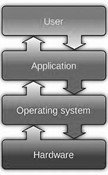
Basic Operating System
These days, operating systems are found in a wide range of devices, from personal computers to smartphones. For example, almost every smartphone today uses the latest Android operating system.
An operating system handles several basic tasks, such as receiving input from a keyboard, sending output to the display, managing files and directories on the disk, and controlling peripheral devices like printers. It can also manage either a single task or multiple tasks at the same time.
The Architecture of Operating Systems
Operating systems manage a computer's hardware resources. The two main components of an operating system that handle critical functions are the kernel and the shell.
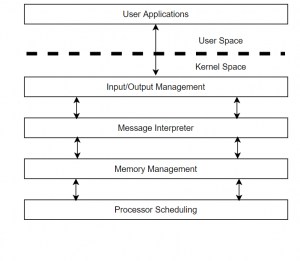
OS Architecture
When a user issues a command to perform an operation, the request is sent to the shell, also known as the interpreter. The shell then translates the human-readable command into machine code and passes it on to the kernel.
Once the kernel receives the request, it processes it and displays the result on the screen. The kernel is often referred to as the "heart" of the operating system because it handles all the essential operations.
Shell
The shell is a software component that sits between the user and the kernel, providing access to the kernel's services. It acts as an interpreter, converting user commands into machine code. There are two main types of shells in different operating systems: command-line shells and graphical shells.
Command-line shells offer a command-line interface (CLI), while graphical shells provide a graphical user interface (GUI). While both types perform similar functions, graphical user interfaces tend to operate slower than command-line interfaces.
Types of Shells
- Korn Shell
- Bourne Shell
- C Shell
- POSIX Shell
Kernel
The kernel is a crucial part of the operating system. It acts as a bridge between the shell and the hardware, responsible for running programs and ensuring secure access to the machine's hardware. The kernel also handles scheduling, keeping track of all processes and maintaining a timetable. There are several types of kernels, including:
- Monolithic Kernel
- Microkernels
- Exokernels
- Hybrid Kernels
Functions of a Computer Operating System
An operating system performs several key functions:
- Memory Management
- Task or Process Management
- Storage Management
- Device or Input/Output Management
- Kernel or Scheduling
Memory Management
Memory management involves handling the computer's memory resources. There are two main types of memory: primary and secondary. The operating system allocates memory space for programs and software, ensuring memory is freed up when no longer needed.
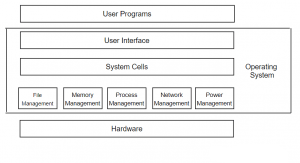
Operating System Memory Management
Memory management is crucial for an operating system, especially in multitasking environments, where the OS must switch memory space between different processes. Every program requires memory to run, and the memory management unit (MMU) provides this space.
A CPU uses two types of memory: virtual memory (RAM) and physical memory (hard disk storage). The operating system manages the virtual memory address spaces, and physical memory allocation is based on these virtual addresses.
Before executing instructions, the CPU sends a virtual address to the memory management unit. The MMU then converts this into a physical address, which is sent to the real memory, allowing it to allocate space for the programs or data.
Task or Process Management
Process management refers to an instance of a program that is currently being executed. Each process includes several components, such as an identifier, program counter, memory pointer, context data, and more. Essentially, a process is the execution of a set of instructions.
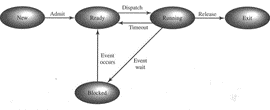
Process Management
There are two types of process management methods: single-process and multitasking. The single-process method handles one application running at a time, while the multitasking method allows multiple processes to run simultaneously.
Storage Management
Storage management is a function of the operating system that handles memory allocation of the data. The system consists of different types of memory devices, such as primary storage memory (RAM), secondary storage memory, (Hard disk), and cache storage memory.
Instructions and data are placed in the primary storage or cache memory, which is referenced by the running program. However, the data is lost when the power supply cut off. The secondary memory is a permanent storage device. The operating system allocates a storage place when new files are created and the request for memory access is scheduled.
Device or Input/output Management
In computer architecture, the combination of CPU and main memory is the brain of the computer, and it is managed by the input and output resources. Humans interact with the machines by providing information through I/O devices.
The display, keyboard, printer, and mouse are I/O devices. The management of all these devices affects the throughput of a system; therefore, the input and output management of the system is a primary responsibility of the operating system
Scheduling
Scheduling by an operating system is a process of controlling and prioritizing the messages sent to a processor. The operating system maintains a constant amount of work for the processor and thus balances the workload. As a result, each process is completed within a stipulated time frame.
Hence, scheduling is very important in real-time systems. The schedulers are mainly of three types:
- Long term scheduler
- Short term scheduler
- Medium-term schedule
Types of Operating Systems
In general, computer operating systems can be broadly categorized into two types:
- Normal Operating System
- Real-Time Operating System
Types of Operating Systems
Normal Operating System
The normal operating system is further divided into two types:
- Character User Interface (CUI) Operating System
- Graphical User Interface (GUI) Operating System
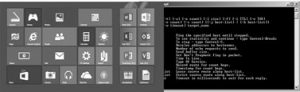
GUI and CUI
Character User Interface Operating System (CUI)
The CUI operating system is a text-based system where users interact with the software or files by typing commands to perform specific tasks. Command-line operating systems, such as DOS and UNIX, rely solely on the keyboard to input commands. An advanced command-line operating system tends to be faster than its graphical counterpart.
Graphical User Interface Operating System (GUI)
A GUI operating system is a mouse-based system, like Windows or Linux, where users can perform tasks or operations without typing commands. Files or icons can be opened or closed by clicking them with a mouse. Both the mouse and keyboard are used to interact with the system for various purposes. Most embedded projects are developed on GUI-based operating systems. However, GUI operating systems are generally slower than command-line systems.
Real-Time Operating System (RTOS)
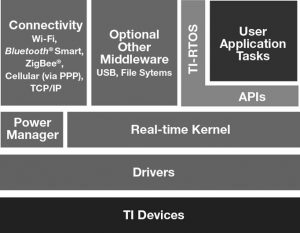
Real-time operating systems, also known as multitasking systems, are designed to run applications at precise, scheduled times with high reliability. Unlike normal operating systems, which manage hardware resources, RTOS focuses on ensuring that tasks are completed within specific time constraints.
RTOS
A real-time operating system is specifically designed for real-time applications, including embedded systems, industrial robots, scientific research equipment, and more. Real-time operating systems can be further classified into two types: soft real-time operating systems and hard real-time operating systems.
Examples of RTOS
- Linux
- VxWorks
- TRON
- Windows CE
Hard Real-Time System
A hard real-time system is a time-sensitive system where meeting deadlines is critical for performance. In a hard real-time operating system, completing tasks within a specified time frame is essential.
For example, if a user expects an output 10 seconds after input, the system must process the data and provide the output exactly at the 10-second mark. If the output is given at 9 or 11 seconds, the system has failed to meet the deadline.
Hard real-time systems are commonly used in critical applications, such as military and defense systems, where precise timing is crucial.
Soft Real-Time System
In a soft real-time system, meeting deadlines is important but not mandatory for every task. While missing a deadline by a second or two may occur without significant impact, consistent delays can degrade system performance. Examples of soft real-time systems include computers, audio and video systems, and Android-based applications, such as automatic gate openers.
Batch Operating System
In a batch operating system, users do not interact directly with the computer. Instead, they prepare their tasks offline, often using punch cards, and then load the data into the system. To improve processing speed, tasks that require similar operations are grouped together and processed as a batch. Operators manage the sorting of programs into batches to optimize performance. This type of operating system was widely used in earlier computing systems.
Advantages of Batch Operating Systems
- A large volume of work can be easily handled in a repetitive manner.
- Different users can easily divide their tasks in the batch system.
- Inactive time in batch systems is minimal.
- The time required to complete a task can be predicted by the processor when tasks are queued.
Disadvantages of Batch Operating Systems
- Batch operating systems can be costly.
- Debugging can be complex.
- Only experienced individuals should operate these systems.
Distributed Types of Operating Systems
A distributed operating system is a modern advancement in computing, widely used across the globe. This system allows independent, interconnected computers to communicate with one another. Each system operates autonomously with its own processing and memory units. These are often referred to as "loosely coupled" systems, and they come in various sizes and configurations.
The main advantage of distributed operating systems is that users can access software or documents stored on other systems within the network. This means there is remote access to resources across connected devices.
There are several types of distributed operating systems, including:
- Peer-to-Peer (P2P): This system involves nodes that share data equally. All nodes contribute to the system’s functionality, and those that communicate with others are referred to as shared resources. This system is typically set up through a network.
- Client/Server: In this system, a client sends requests to a server, which provides services in return. A single server can serve multiple clients, but each client only communicates with one server at a time. These systems rely on network communication and thus fall under the category of distributed systems.
Advantages of Distributed Operating Systems
- Efficient Data Sharing: All nodes are interconnected, allowing for streamlined data sharing.
- Easy Scalability: Adding new nodes is simple, and the system can easily scale based on needs.
- Fault Tolerance: The failure of one node doesn’t affect the others; the remaining nodes continue to communicate with each other.
Disadvantages of Distributed Operating Systems
- Security Challenges: Ensuring robust security for all connections and nodes can be complex.
- Potential Data Loss: During node transmission, some data might be lost.
- Complex Database Management: Compared to individual user systems, managing databases in a distributed environment is more complex.
- Data Overloading: Transmission between nodes can lead to data overload.
Time-Sharing Operating System
A time-sharing operating system allows multiple users at different locations to share a single system at the same time. It’s essentially an expansion of multiprogramming, where processor time is divided among users, minimizing response time.
In contrast to batch systems, where the focus is on maximizing processor utilization, time-sharing systems aim to reduce response time. The CPU switches between tasks quickly, so each user receives a rapid response.
Time-sharing operating systems work by allocating a specific time slot to each user. Initially, batch systems have evolved into time-sharing systems for better user interaction.
Advantages:
- Quick response times
- Eliminates software duplication
- Minimal processor idle time
Disadvantages:
- Reliability can be a concern
- Enhanced security is required for both data and programs
- Data communication issues can arise
Multi-User Operating Systems
A multi-user operating system allows different users to access and operate on a single system. These systems facilitate communication through computers or terminals connected via a network. The system ensures that one user's issues do not affect others.
Features of Multi-User Operating Systems:
- Invisibility: Functions like disk formatting happen behind the scenes.
- Backend Data Processing: Allows for data processing even if the frontend is inactive.
- Resource Sharing: Devices such as hard disks, printers, and files can be shared.
Types of Multi-User Operating Systems:
- Distributed Operating System: A network of interconnected devices that work together as one system, sharing resources efficiently. Examples include mobile apps and digital banking systems.
- Time-Sliced System: Each user is allocated a short time slice of processor time. Tasks are prioritized and scheduled by an internal scheduler.
- Multiprocessor System: Multiple processors work concurrently, reducing the time required to complete tasks. This system is commonly found in modern operating systems like Windows, where tasks like music playback and document editing can occur simultaneously without affecting performance.
Advantages of Multi-User Operating Systems:
- Easy resource distribution
- Strong data backup
- Used in libraries and educational systems
- Eliminates disruption
- Improved speed and efficiency
- Real-time application support
Disadvantages of Multi-User Operating Systems:
- Virus risks due to multiple computers accessing the same system
- Privacy and confidentiality concerns
- Creating multiple accounts can be risky and complicated
Other Types of Operating Systems:
- Network OS
- Multitasking OS
- Clustered OS
- Real-Time OS
- Linux OS
- Mac OS
Conclusion
This overview covered the different types of operating systems, their working principles, architecture, advantages, and disadvantages. To wrap up, here’s a question for the readers: What are the advantages of the Linux operating system over Windows?
Related Articles

Christopher Anderson
Christopher Anderson has a Ph.D. in electrical engineering, focusing on power electronics. He’s been a Senior member of the IEEE Power Electronics Society since 2021. Right now, he works with the KPR Institute of Engineering and Technology in the U.S. He also writes detailed, top-notch articles about power electronics for business-to-business electronics platforms.
Subscribe to JMBom Electronics !