

 All Products


AI-Powered Secure Locker with BrainChip Technology
 Dec 24, 2025
 586
586Catalog
AI-Powered Secure Locker with BrainChipAI-Enabled Safe Locker Project ArchitectureTesting and ValidationFinal ThoughtsRelated ArticlesCreate a smart locker that unlocks only when it recognizes both the user's face and voice command, ensuring access is granted only to authorized individuals. This system uses energy-efficient neuromorphic AI for processing. This article offers a quick overview of the AI-enabled secure locker, its features, and more.
AI-Powered Secure Locker with BrainChip
Key Features
- Face Recognition: Uses Vision AI with Spiking Neural Networks (SNN) for secure access.
- Wake Word Detection: Activated by audio cues using Audio SNN for voice command recognition.
- Servo-Controlled Locking Mechanism: Physically locks/unlocks with precision.
- Local, Low-Latency Inference: All processing happens locally, no need for cloud access.
- On-Chip Learning: Easily add new users with on-chip learning.
Required Components
| Component | Description |
|---|---|
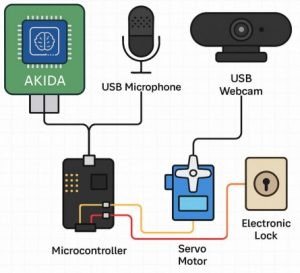
| BrainChip Akida USB Dev Kit | Neuromorphic processor (main AI engine). |
| USB Microphone | Captures audio for wake-word detection. |
| USB Camera | Captures visual data for face recognition. |
| Servo Motor (SG90/996R) | Controls the physical lock mechanism. |
| Raspberry Pi 4 / Jetson Nano | Acts as the host controller running Linux (Ubuntu 20.04). |
| Breadboard + Jumper Wires | Connects components like the servo motor. |
| Power Source | USB power bank or adapter for power supply. |
Software Setup
- Install Dependencies Run the following commands to update your system and install necessary dependencies: sudo apt update sudo apt install python3-pip libatlas-base-dev pip3 install akida speechrecognition opencv-python numpy pyserial
- Install the Akida SDK Download the BrainChip Akida SDK from the official website. Follow the provided instructions to install both the Python SDK and runtime.
AI-Enabled Safe Locker Project Architecture
Step-by-Step Implementation
Step 1: Data Collection & Preprocessing
a. Face Dataset (Images)
To collect face images for authorized users, use OpenCV to capture 20–30 frontal face images:
import cv2

# Start the camera
cap = cv2.VideoCapture(0)

# Capture 30 images
for i in range(30):
    ret, frame = cap.read()
    cv2.imwrite(f"user_face_{i}.jpg", frame)

# Release the camera
cap.release()
b. Voice Samples (Wake Word)
Record your custom phrase (e.g., "Unlock Akida") using PyAudio or Audacity to create a set of voice samples for wake word detection.
Step 2: Train SNN Models with Akida
a. Convert Face Classifier to SNN
Use a pre-trained MobileNet or a custom CNN for face feature extraction, then convert it to a Spiking Neural Network (SNN) using Akida's tools:
from akida import Model

# Load the CNN model
model = Model("cnn_model.h5")

# Quantize the model and convert it to SNN
model.quantize()
model_to_akida = model.convert()

# Save the SNN model
model_to_akida.save("face_model.akd")
b. Convert Wake Word Classifier
For voice recognition, preprocess the audio using MFCC, then pass it through a CNN and convert the classifier to an SNN using Akida tools.
Step 3: Load Models and Perform Inference
Load the Models
from akida import AkidaModel

# Load the models for face and wake word detection
face_model = AkidaModel("face_model.akd")
audio_model = AkidaModel("wake_model.akd")
Audio Inference (Wake Word Detection)
Detect if the wake word "Unlock Akida" is spoken:
def is_wake_word(audio):
    prediction = audio_model.predict(audio)
    return prediction == "unlock_akida"
Face Inference (Real-Time Face Match)
Check if the detected face matches an authorized user:
def is_authorized_face(frame):
    face = detect_and_crop_face(frame)  # You’ll need to implement this function
    prediction = face_model.predict(face)
    return prediction == "authorized_user"
Step 4: Control the Servo Lock
To control the servo motor that locks and unlocks the locker, use the following Python code. This will control the servo’s position to either unlock or lock the locker:
import RPi.GPIO as GPIO
import time

# Set up GPIO for servo control
servo_pin = 17  # The GPIO pin connected to the servo
GPIO.setmode(GPIO.BCM)  # Use BCM pin numbering
GPIO.setup(servo_pin, GPIO.OUT)  # Set the pin as an output

# Initialize PWM (Pulse Width Modulation) on the servo pin at 50Hz
servo = GPIO.PWM(servo_pin, 50)
servo.start(0)  # Start the servo at 0% duty cycle (locked position)

# Function to open the locker
def open_locker():
    servo.ChangeDutyCycle(7.5)  # Adjust the duty cycle to unlock (depends on your servo)
    time.sleep(1)  # Wait for the servo to move
    servo.ChangeDutyCycle(0)  # Stop the PWM signal

# Function to close the locker
def close_locker():
    servo.ChangeDutyCycle(2.5)  # Adjust the duty cycle to lock (depends on your servo)
    time.sleep(1)  # Wait for the servo to move
    servo.ChangeDutyCycle(0)  # Stop the PWM signal
Step 5: Integration Logic
Now that you've set up the individual components, it’s time to integrate everything into a working system that checks the wake word, performs face recognition, and unlocks the locker if both match:
import cv2
import speech_recognition as sr

# Initialize the camera for face recognition
cam = cv2.VideoCapture(0)

while True:
    # Wake word check
    audio = record_audio_sample()  # You should define this function to record audio
    if not is_wake_word(audio):  # Check if the wake word "Unlock Akida" is spoken
        continue  # If not, continue the loop

    # Face check
    ret, frame = cam.read()  # Capture a frame from the camera
    if is_authorized_face(frame):  # Check if the face matches an authorized user
        open_locker()  # Unlock the locker
        print("Locker opened!")
    else:
        print("Face not recognized.")  # Deny access if the face is not authorized
Testing and Validation
Once you’ve set everything up, it's time to test and validate the system:
- Add a New User: Use BrainChip Akida’s on-chip learning API to add new users to the system. This allows you to easily update the face and voice recognition models as you onboard new users.
- Wrong Voice or Face Detection: Test the system by attempting to unlock with an unrecognized voice or face. The system should deny access in such cases.
- Logging Attempts: Log each attempt (successful or unsuccessful) for further analysis and debugging. You can use Python's built-in logging module to log attempts:
import logging

# Set up logging
logging.basicConfig(filename="locker_access.log", level=logging.INFO)

# Log successful or failed access
def log_attempt(success, reason=""):
    if success:
        logging.info("Locker opened successfully.")
    else:
        logging.warning(f"Failed attempt: {reason}")
- User Feedback: Once the system is fully set up, test it with different voice and face inputs. Make sure to adjust the lock mechanism and detection sensitivity according to your real-world testing results.
Final Thoughts
Once you’ve tested and validated everything, you should have a smart locker that opens only when both the correct wake word and face are detected. Be sure to:
- Fine-tune the wake word and face recognition accuracy.
- Adjust the servo’s duty cycle to ensure reliable lock/unlock actions.
- Use on-chip learning to easily add new users and improve the system's performance over time.
Related Articles
Diode Dynamics: Real-World Behavior in Fast Power and RF Circuits

Amanda Miller
Amanda Miller is a senior electronics engineer with 6 years of experience. She focuses on studying resistors, transistors, and package design in detail. Her deep knowledge helps her bring innovation and high standards to the electronics industry.
Subscribe to JMBom Electronics !