

 All Products


Setting Up an NVIDIA H100 Server
 Dec 23, 2025
 538
538Catalog
What is an NVIDIA H100 Server?How Does the NVIDIA H100 Server Work?ComponentsHow to Scale an NVIDIA H100 ServerThe Importance of PCIe Gen5 to Maximize PerformanceHow to Choose the Right Form Factor for NVIDIA H100 GPU ServerCustom Configuration Options Through Online System ConfigurationsOverview of the NVIDIA H100 GPU Server SystemRelated ArticlesThe NVIDIA H100 GPU, built on the advanced Hopper architecture, is designed for high-performance computing (HPC) and AI workloads. It delivers top-tier performance, security, and scalability for demanding tasks like deep learning training, inference, and HPC. This powerful chip is essential in servers, where it plays a pivotal role in accelerating AI and HPC processes. NVIDIA provides a range of server configurations, such as the DGX H100 and HGX H100, which feature multiple H100 GPUs to handle intensive applications. When setting up an AI server with NVIDIA H100 GPUs, careful attention must be given to both hardware selection and software optimization. In this article, we’ll guide you through the process of setting up an NVIDIA H100 server, exploring how it works and its real-world applications.
What is an NVIDIA H100 Server?
An NVIDIA H100 server is a high-performance computing (HPC) platform built for demanding AI workloads and complex computational tasks. It features the specialized NVIDIA H100 Tensor Core GPU, powered by the Hopper architecture. This system is designed to tackle intensive tasks such as deep learning training, large language models, AI training and inference, scientific computing, and other high-performance applications.
The server setup combines multiple H100 GPUs, connected through high-speed interconnects, to create a powerful computing node. It also supports NVMe drives, enhancing overall performance. Various server manufacturers, including Silicon Mechanics and Thinkmate, offer H100-based systems for these resource-demanding applications.
How Does the NVIDIA H100 Server Work?
The NVIDIA H100 GPU is central to the performance of AI servers, boosting the speed of both AI model training and inference. With its advanced architecture, including fourth-generation Tensor Cores and Transformer Engines, the H100 accelerates the real-time training of complex AI models, enabling faster deployment of these models.
Additionally, the H100 features high-speed interconnects like PCIe Gen5 and NVLink, which further enhance the training and inference processes for AI tasks and large language models. This results in shorter development cycles, improved overall performance, and the ability to handle more complex AI applications with ease.
Components
To build an NVIDIA H100-based AI server, you’ll need the following hardware components, which are detailed below:
NVIDIA H100 GPUs
The NVIDIA H100 GPU delivers up to 30x better performance than its predecessor, making it ideal for AI training and inference tasks. The number of GPUs required depends on the demands of your specific workload.
CPU
A high-performance CPU is essential for managing data pre-processing and system coordination. Common choices for AI servers include AMD EPYC and Intel Xeon processors.
RAM
AI model training requires large amounts of memory. A minimum of 256GB of RAM is recommended, but workloads that handle massive datasets may need 512GB or more.
Storage
Opt for high-speed NVMe SSDs with at least 4TB of storage. For workloads with extensive datasets, consider adding external or cloud storage solutions.
Motherboard & PCIe Lanes
Ensure the motherboard supports multiple PCIe Gen5 slots to accommodate the H100 GPUs and provide maximum bandwidth.
PSU (Power Supply Unit)
Each H100 GPU consumes around 350W of power. For multiple GPUs, a power supply of 2000W or higher is recommended.
Cooling System
Given the high heat output of the H100 GPUs, a liquid cooling system combined with high-performance fans is essential to maintain optimal performance.
Setting Up an NVIDIA H100 Server
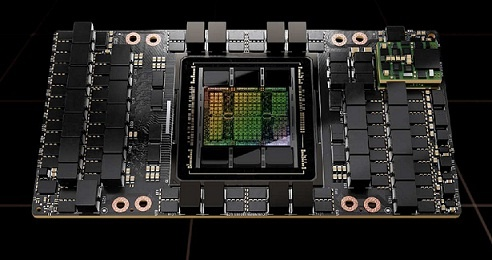
Installing an NVIDIA H100 GPU in a server requires careful attention to hardware compatibility, proper handling, and meeting power requirements to ensure optimal performance and longevity. This detailed, step-by-step guide will walk you through the process of successfully installing the NVIDIA H100 GPU on your server, enabling high-performance computing for machine learning, AI, and other demanding workloads.
Setting up an NVIDIA H100 Server
Server Compatibility Verification
Before installing the NVIDIA H100 GPU, ensure your server meets its compatibility requirements. The H100 GPU is compatible with PCIe 5.0 and 4.0 slots. Verify that your server’s motherboard supports at least PCIe 4.0 x16 to achieve optimal performance.
The H100 is available in different form factors, such as SXM and PCIe. For PCIe versions, ensure your server chassis has enough clearance for the GPU's dimensions. The PCIe version of the H100 requires a minimum of 350W power for each GPU, so your power supply unit (PSU) should be equipped with the appropriate PCIe power connectors, like 8-pin or 12VHPWR.
Setting Up the Server
Follow these steps to prepare your server for GPU installation:
- Power Off and Prepare the Server Begin by powering down the server and disconnecting all cables. Use an anti-static wrist strap to prevent electrostatic discharge (ESD) damage to the components or GPU.
- Identify a PCIe x16 Slot Find an available PCIe x16 slot that meets the GPU’s requirements. If necessary, remove any brackets or blanking plates that may be obstructing the slot.
- Install the GPU Insert the GPU Carefully align the NVIDIA H100 GPU with the PCIe slot. Gently insert the GPU into the slot until it is securely seated. Secure the GPU Use the appropriate screw or retention bracket to fasten the GPU to the server frame, ensuring it remains firmly in place. Connect Power Cables Attach the required PCIe power cables from the PSU to the GPU. Ensure all connections are secure and tightly fitted.
Once the GPU is installed and powered, you can proceed with the remaining setup steps, including configuring drivers and system settings.
Configure the Server System
Once the physical installation of the NVIDIA H100 GPU is complete, follow these steps to configure your server:
- Power On the Server Reconnect the power supply and turn on the server.
- Install NVIDIA Drivers Download and install the latest NVIDIA data center drivers from the official NVIDIA website.
- Verify GPU Recognition Use the nvidia-smi command in the Linux terminal or check in Windows Device Manager to confirm that the H100 GPU is recognized by the system.
- Update GPU Firmware Check for any available firmware updates for the NVIDIA H100 GPU to ensure compatibility and optimize performance.
How to Scale an NVIDIA H100 Server
To efficiently scale an NVIDIA H100 server, it’s important to optimize GPU density for maximum resource utilization and high output, especially when handling machine learning (ML) and AI workloads. Follow these steps for effective scaling:
- Understand Task Requirements Start by assessing your ML or AI tasks, considering factors like memory needs, parallelism, and computational intensity. This will guide your GPU scaling strategy.
- Utilize MIG (Multi-Instance GPU) The H100 GPU's MIG feature allows you to partition each GPU into up to seven instances, each customizable for specific tasks or user needs. This increases the overall efficiency of the GPU.
- Manage Heat High-density configurations generate significant heat. Use advanced cooling solutions to maintain stable temperatures, ensuring sustained performance and reliability.
- Plan for Future Expansion Choose a server architecture that supports easy integration of additional GPUs or other hardware components. This will streamline future scaling and reduce both time and costs associated with computational growth.
The Importance of PCIe Gen5 to Maximize Performance
PCIe Gen5 significantly enhances the performance of the NVIDIA H100 GPU server by improving communication and data transfer across key components. Here’s how it contributes to better performance:
- Faster Communication in SoCs and MCMs PCIe Gen5 boosts the transfer rate compared to PCIe Gen4, enabling faster communication between the H100 GPUs and other system components, such as chips mounted on multichip modules (MCMs). This is crucial for AI/ML applications that require high-speed data processing and transfer.
- Reduced Latency By lowering latency, PCIe Gen5 minimizes the time it takes to send and receive data between clients and the server. This is particularly beneficial for real-time AI applications running on H100 GPU servers, where responsiveness is key.
- Increased Bandwidth The increase in bandwidth from PCIe Gen5 allows more data channels, resulting in faster data flow. This is especially valuable for tasks involving large datasets, such as training complex AI models. PCIe Gen5 ensures that your server infrastructure can handle future advancements in GPU technology, making transitions to next-gen GPUs smoother.
By leveraging these advantages, organizations can significantly enhance the efficiency and performance of their NVIDIA H100 GPU servers, accelerating AI innovation and improving computational speed.
How to Choose the Right Form Factor for NVIDIA H100 GPU Server
Selecting the right form factor for your NVIDIA H100 GPU server is crucial to optimizing the performance of your HPC and AI workloads. Consider the following factors when choosing the appropriate form factor:
- Space Limitations Rack servers are ideal for scalable setups and fit into standard data center configurations, making them suitable for organizations with limited space.
- Cooling Capacity The thermal design of the server is important, especially for high-end GPUs like the NVIDIA H100. Blade servers are often equipped with optimized cooling solutions for dense configurations, which helps maintain thermal efficiency.
- Expansion Requirements Consider future expansion needs, such as adding more GPUs or hardware. Tower servers generally offer more space for physical expansion due to their larger frames, providing flexibility for future upgrades.
Custom Configuration Options Through Online System Configurations
When configuring an NVIDIA H100 server, various components can be customized to meet specific performance and workload demands. Key configurable parameters include:
- CPU Selection Choose a CPU based on the workload's requirements. For CPU-intensive tasks, a high-clock-speed processor may be necessary, while parallel processing tasks benefit from a higher core count.
- Memory Configuration Balance speed and capacity by selecting the appropriate RAM type and size for your specific computational needs. Ensure the memory meets the demands of your AI and HPC workloads.
- Storage Options Choose between hybrid, HDD, or SSD configurations based on a trade-off between speed, cost, and storage capacity, ensuring that the storage solution supports the scale of your workloads.
- Networking Hardware Consider network interface card (NIC) options based on the required bandwidth and latency sensitivity of your applications.
- Power Supply Units (PSUs) Given the high power consumption of the H100 server, it’s essential to use highly energy-efficient PSUs to meet power requirements while minimizing energy costs.
- Cooling Solutions Select cooling solutions based on your deployment environment to ensure optimal thermal performance and prevent overheating.
By carefully considering these parameters, businesses can configure NVIDIA H100 servers that strike the right balance between efficiency, cost-effectiveness, and performance.
Overview of the NVIDIA H100 GPU Server System
The NVIDIA H100 GPU server typically includes one or more H100 GPUs along with other components such as CPUs and high-speed interconnects. These servers are central to AI applications, including inference, deep learning training, and HPC tasks, making them ideal for demanding computational workloads.
Regarding NVIDIA GB200
The NVIDIA GB200 is a high-performance GPU model designed by NVIDIA for specialized tasks, including AI workloads and high-performance computing. It is part of the broader NVIDIA GPU family, built to offer faster processing speeds and more energy-efficient performance for AI and data-intensive applications. Would you like more details on the specific features and capabilities of the NVIDIA GB200?
Related Articles
Diode Dynamics: Real-World Behavior in Fast Power and RF Circuits
How Can You Fix an Oil Pressure Sensor?

Christopher Anderson
Christopher Anderson has a Ph.D. in electrical engineering, focusing on power electronics. He’s been a Senior member of the IEEE Power Electronics Society since 2021. Right now, he works with the KPR Institute of Engineering and Technology in the U.S. He also writes detailed, top-notch articles about power electronics for business-to-business electronics platforms.
Subscribe to JMBom Electronics !